Documentation · Security
Security and personal data
What stays on site, who gets access and how, how evidence is protected, on what basis recognition operates and how people’s rights are ensured. A document for the security department, IT, legal counsel and the person responsible for personal data processing.
Version 1.0, October 11, 2026. This document is for information purposes only, describes a standard delivery and does not constitute an offer. The scope of work and terms are set out in the contract. The personal data section is a technical description and set of recommendations, not a legal opinion.
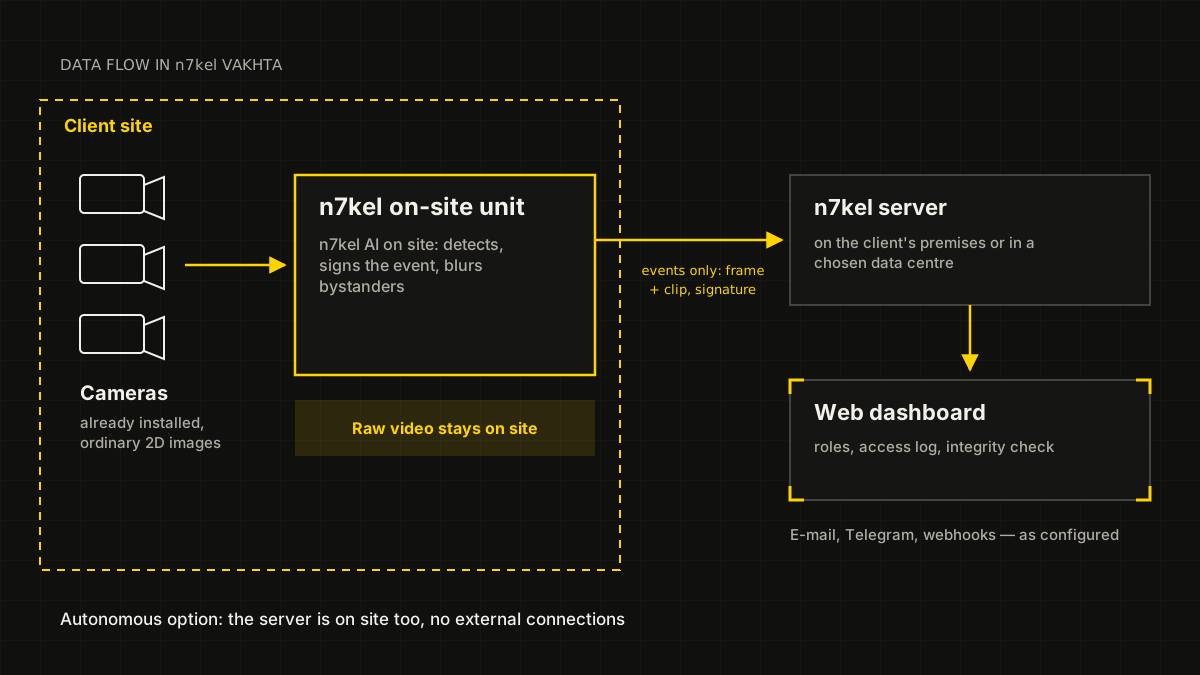
Data flow diagram
Site cameras send video to the n7kel on-site unit. Raw video stays on site; only signed events with a frame and a short clip go to the server. In the autonomous option, the server is also on the client’s premises and there are no external connections.
1. Key points
- Data stays with the client. All information is confidential and is not shared with third parties. The only exceptions are those expressly provided for by the contract and the law: transfer of match information to the authorized body when the wanted-list check module is enabled (under an agreement with that body), and processing on the client’s instructions in the hybrid option. Any restrictions the client needs are put in place at the client’s request.
- Visitor recognition is off by default. It is enabled only by the client’s decision, as a separate module, and only on a lawful basis — the person’s consent or an agreement with the authorized government bodies. Employees are identified only with their written consent.
- Video stays on site. There is no continuous recording: the n7kel on-site unit keeps only the last few seconds in memory for video clips. In the hybrid option, only the event, the frame and a clip of about 10 seconds leave the site. In the autonomous option nothing leaves the site.
- Biometrics never leave the client’s environment. Reference templates are stored encrypted; photographs are not kept; if consent is withdrawn, the template is deleted.
- Every access to evidence is logged. Viewing and downloading of frames and video clips is recorded in the activity log, including actions by the vendor’s specialists.
- Records are protected against retroactive editing. Every event is signed by the on-site unit and linked to the previous one; verification, including independent verification, detects any modification, deletion or insertion of a record.
- A person makes the decision. Platform signals are grounds for review, not for automatic measures against an employee.
2. What data is processed and where it is stored
The platform does not record video continuously. If the site has a video recorder, it operates under its own rules and outside the platform.
| Data | Where it is stored | Does it leave the site |
|---|---|---|
| Camera video stream | Nowhere: the on-site unit keeps only the last few seconds in memory for video clips | No |
| Employee face reference templates | On-site unit, encrypted; photographs are not kept | No |
| Patient and customer face reference templates (only when the modules are enabled) | Within the client’s environment, encrypted | No |
| Wanted-list check data (only when the module is enabled) | Check log — on the client’s server; how the lists are obtained is determined by the agreement with the authority | Match information — to the authorized body, as the agreement provides |
| Speech recordings and transcripts (n7kel Voice) | Client’s server; in the hybrid option — under the contract | Autonomous option — no; hybrid — under the contract |
| Event frame and video clip | On-site unit (until sent and for 3 days after) and server | Hybrid option — to the platform server; autonomous — no |
| Event details: time, post, type, who was identified | On-site unit, server | Hybrid option — to the platform server; autonomous — no |
| Employee directory, consent flags | Server | Entered by the client |
| POS transactions | Server | Sent by the client’s POS system |
| Condition assessment (only when the module is enabled) | On-site unit → server, without images | Hybrid option — to the platform server; autonomous — no |
| Period analytics | Server | Contains no images |
3. Network and external connections
3.1. The n7kel on-site unit connects only to the platform server (in the autonomous option, to the client’s server) and, within the site, to cameras, DNS and NTP. No component of the on-site unit contacts third parties: not for updates, not for licenses, not for usage statistics. When the wanted-list check module is enabled, the exchange with government databases is performed by the server, over a channel determined by the agreement with the authority.
3.2. No inbound connections to the on-site unit from the internet are required. The exchange protocol between the on-site unit and the server has no means of transmitting a video stream.
3.3. Users and external systems access the server over HTTPS only. We recommend placing cameras in a separate network segment and restricting the on-site unit’s connections with the site firewall.
3.4. During acceptance, the on-site unit’s outbound connections are checked; the result is attached to the acceptance certificate.
3.5. Recognition is performed by n7kel AI on the client’s equipment: no foreign or cloud recognition services, external APIs or subscriptions are used, and no data is transferred abroad. n7kel AI is trained and tested on ordinary 2D images, so the cameras you already have are suitable. 3D cameras are supported too, if they are already on site or the task requires them.
4. Roles and access rights
Every section and every request checks the user’s role and the sites available to them.
| Role | Who it is | Main rights |
|---|---|---|
| Organization administrator | The person responsible for the system on the client’s side | All sections of the organization: reference data, users, settings, checkout, API keys and webhooks, retention periods; enabling the condition assessment module |
| Occupational safety specialist / security department | Security department, occupational safety | Dashboard, violation review, event log, analytics, integrity check and evidence package export |
| Site manager | Station manager, area supervisor | The same rights as the security department, but only for assigned sites |
| Auditor | Inspector, internal audit | View only: dashboard, violations, event log, analytics, integrity reports, checkout, activity log |
5. Accounts and access to evidence
- accounts are personal; sharing credentials with other persons is not allowed;
- password guessing is limited: after several failed attempts, login is temporarily blocked, and the block duration increases with each error; blocks are logged;
- a password change, account deactivation, or a change of role or sites immediately ends all of the user’s sessions;
- a link to a frame or video clip is issued to a specific user, is valid for 15 minutes and only while the user has access to the site;
- notifications (webhooks, Telegram, e-mail) contain no links to images; external systems receive frames only with a key that has a separate permission;
- vendor specialists work in a separate section and access the client’s data only at the client’s request; every such access is visible to the client’s administrator and auditor.
6. Activity log
6.1. The activity log records who did what in the system and when: logins, viewing and downloading of evidence, changes to violation statuses, reference data, retention periods, access keys and privacy settings.
6.2. The log itself is built as a chain of records: any modification is detected by verification. The default log retention period is 1095 days.
6.3. Every request from an external system with an API key, including rejected ones, is recorded in the request log (kept for 180 days by default).
Evidence
7. Evidence integrity
Every event is saved with a frame captured at the moment of the event and a video clip and protected so that retroactive editing is detected by verification.
- Numbering. Each on-site unit keeps its own continuous event count: a missing number is immediately visible.
- Chaining. Each record contains a fingerprint of the previous one: a single record cannot be changed unnoticed.
- On-site unit signature. An event is signed with a key that exists only in the on-site unit; neither the server nor users can create or alter a record on its behalf.
- Frame and video in the signature. File fingerprints are part of the signed record: replacing a frame or trimming a video is detected.
- Checkpoints on the client’s side. The state of the common log is regularly signed and stored on the client’s hardware: not even the vendor can rewrite history unnoticed.
8. Integrity check and independent verification
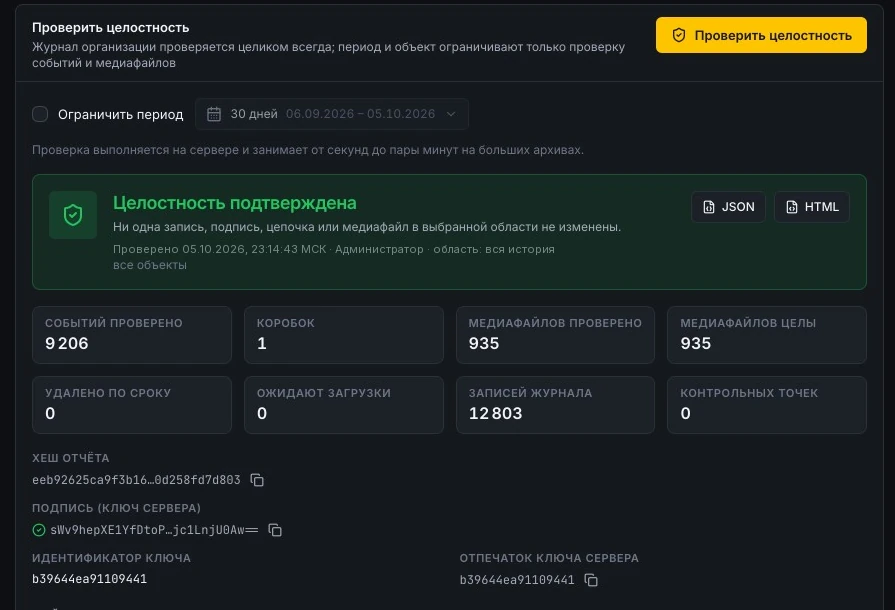
8.1. In the Integrity section, an authorized user selects a period and a site and starts verification. The server rechecks the signatures, the continuity of the chains, the presence and immutability of frames and video clips, the match between database records and signed records, and POS transactions. The result is a signed report that can be downloaded and attached to case materials.
8.2. For an investigation, an evidence package for the period is exported: signed events, the log, checkpoints, frames and video clips, and verification instructions.
8.3. The package is verified without the platform server and without the vendor’s involvement: legal counsel, an auditor or an expert runs the verification program included in the delivery on any computer. The program does not access the network. The server key fingerprint is compared with the one specified in the contract, which confirms that the package was issued by your installation.
8.4. What verification proves: the frame and video clip are exactly those the on-site unit recorded at the moment of the event; no event has been modified, deleted or inserted retroactively. What verification does not prove: that the scene in front of the camera was genuine and that n7kel AI interpreted it correctly — which is why an event remains a signal for review by a person.
9. Retention periods
Retention periods are set by the client. Deletion on expiry is automatic and is itself recorded in the integrity log, so verification can distinguish deletion on expiry from tampering. A “legal hold” flag preserves materials related to a dispute until it is removed.
| Data | Default, days | Allowed range, days |
|---|---|---|
| Event video clips | 30 | 1–3650 |
| Event frames | 90 | 1–3650 |
| Events, violations and POS transactions | 365 | 7–3650 |
| Equipment status information | 30 | 1–3650 |
| API request log | 180 | 7–3650 |
| User activity log | 1095 | 90–3650 |
10. Anonymization
- the faces and heads of all people except the person the event concerns are irreversibly blurred by the on-site unit before saving and signing; only the blurred version is stored and shown;
- for events not tied to a specific person (for example, “post unattended”), everyone is blurred;
- people who have not consented to identification remain anonymous in events (“no reference”);
- period analytics contains only numbers, without images.
11. Face identification and consent
11.1. Face identification of employees is applied only to those who have given written, voluntary consent. Without a consent flag, the on-site unit does not register a reference template and the employee is not identified.
11.2. Providing biometrics cannot be mandatory. Post occupancy, unattended posts, PPE control, hazardous zones and POS reconciliation work without reference templates — they do not require establishing identity.
11.3. If consent is withdrawn, the employee’s reference templates are deleted from the on-site unit, usually within a minute.
11.4. The “no reference” status is never treated as a mismatch: such a person does not generate “unidentified person”, “working under someone else’s account” or “wrong employee at the till” events. The “undetermined” status (face not visible, person with their back to the camera) also never leads to an accusation.
11.5. Recognition of visitors, customers and patients is off by default. The modules that enable it are described in section 17; each of them is enabled only by the client’s decision and only on a lawful basis.
12. Condition assessment module: off by default
12.1. The auxiliary module assesses an employee’s fatigue and stress relative to their own baseline. Emotion recognition of employees is restricted by law in a number of jurisdictions, therefore:
- the module is off by default and can be fully disabled in the settings: when the module is off, its components are not loaded onto the on-site unit, no data is produced, and the rest of the system works unchanged;
- it can be enabled only if the function is included in the license, by decision of the organization administrator and after acknowledging a legal notice; the acknowledgment is logged;
- the module never creates, escalates or raises the priority of violations and is not grounds for disciplinary or HR decisions;
- the personal baseline is a few numbers in the on-site unit’s RAM while the person is in the frame: it is never written to disk or sent to the server and cannot be used for identification;
- by default, analytics shows only aggregated data by shift and hour; data on an individual employee is visible only to the organization administrator, and every such view is logged.
12.2. We do not recommend enabling the module without a separate legal analysis.
13. Personal data and applicable law
13.1. The client is the personal data controller (operator): the client determines the purposes of processing, the employees covered, the posts, the retention periods, the persons with access and other restrictions. All data stays with the client, is confidential and is not shared with third parties, except where expressly provided for by the agreement and the law. In the autonomous option, only the client holds the data, and the vendor has no access to it. In the hybrid option, the vendor processes data on the client’s behalf under the contract.
13.2. The platform is designed for the personal data legislation of the client’s country:
- Republic of Kazakhstan — Law “On Personal Data and Their Protection”, including the requirement to store personal data in a database located in the Republic of Kazakhstan: in the autonomous option the server is on the client’s premises, and in the hybrid option it is in a data center within the country;
- Republic of Armenia — Law “On Protection of Personal Data”;
- other jurisdictions — on request, during the site survey.
13.3. Recommended processing purposes for the internal policy: occupational safety (PPE, hazardous zones), organization of work at posts, safeguarding of cash (POS reconciliation); tuning of recognition on the site’s annotated examples, if the client has included this purpose in the internal policy. Rules apply only within marked zones and during a post’s active shifts; nothing is recorded outside the zones.
13.4. Before going live, we recommend that the client:
- adopt an internal policy on the use of video analytics: purposes, zones, retention periods, access, violation review procedure;
- have employees acknowledge the notice by signature — we provide a template;
- obtain written consents to face identification — only from those who wish to give them;
- post video surveillance signs in camera coverage areas;
- in the hybrid option, conclude a data processing agreement;
- when n7kel Voice is enabled, notify employees and customers that audio is recorded (signs, an announcement at the start of a call);
- when patient or customer recognition is enabled, approve the procedure for obtaining and withdrawing consent;
- when wanted-list checks are enabled, conclude an agreement with the authorized body.
13.5. The final legal assessment of the procedure for use, including the condition assessment module, is carried out by the client’s legal counsel. We provide a description of protection measures and a staff notice template.
14. Data subject rights
Rights of employees, and of patients and customers recognized with their consent:
- to find out what data about them has been processed — through the person responsible for personal data processing on the client’s side;
- to see the frame and video clip of an event, give an explanation and dispute a violation; in a dispute, an evidence package with independent verification can be exported;
- to withdraw consent to face recognition — the reference template is deleted, and the person is no longer recognized;
- to have data deleted once the set retention periods expire — this happens automatically and is recorded in the log.
Employee requests are received by the client as the personal data controller; the platform provides an employee card and an export of the employee’s events for this purpose.
15. Protection of the product and updates
- the license is signed and bound to the hardware of the on-site unit: moved to another machine, it does not work;
- n7kel AI is delivered encrypted and can be unlocked only by the license of a specific on-site unit; the on-site unit software is delivered compiled, without source code;
- updates are signed: the signature and checksum are verified before installation, downgrades are not allowed, and on failure there is an automatic rollback to the previous version;
- the on-site unit software runs under a separate user account with minimal privileges.
The terms of use, the ban on reverse engineering, the procedure for access to equipment and the destruction of the storage device upon termination of the contract are set out in the license agreement.
16. n7kel Fuel Station Control: protection measures
- every cash transaction receives digital evidence in a SHA-256 fingerprint chain; integrity is checked with one click, and tampering with a record is detected by verification;
- role-based access: administrator, security department, manager, dispatcher;
- speech analytics is connected through n7kel Voice: speech recording and analysis are enabled only after employees and customers have been notified (signs in the checkout area) and on a legal basis determined by the client (section 18);
- the delivery status of every notification by e-mail, Telegram and SMS is verifiable;
- face identification of cashiers is provided for in the architecture and applied only with employee consent.
18. Audio and speech (n7kel Voice)
18.1. n7kel systems can work with audio: n7kel Voice converts speech to text and analyzes it in any language. The module is enabled only by the client’s decision.
- audio recording and analysis only when employees and customers are notified (signs in the service area, an announcement at the start of a call) as the law of the country prescribes;
- analysis runs only in designated service areas and during working shifts;
- speech is recognized on the client’s equipment, and no external recognition services are used;
- the client sets retention periods for recordings and transcripts and access rights; every playback and download is logged;
- the legal basis is determined by the client as the personal data controller; the final assessment is made by the client’s lawyer.
Questions about the documentation
We will answer questions from security, IT, legal and procurement, survey your site and prepare a proposal.