Product · n7kel Access
n7kel Access — access control from the entry checkpoint to the vault
Who may go where and when — and who actually went through. n7kel Access combines access control, turnstiles, security entry airlocks, card and face access and video analytics at entrances. For multi-specialty hospitals, it offers patient face check-in: a patient who has booked an appointment and given consent walks in without queuing at the registration desk, and the appointment opens automatically.
Patient check-in
Patient recognized
Consent to face check-in on file
Appointment opened
- Room
- 214
- Specialist
- General practitioner
- Time
- 10:30
Patient record opened for the doctor
- 10:24:05Face recognized
- 10:24:06Appointment found
- 10:24:06Appointment opened, doctor notified
Security airlock 1
- Outer door · closed
- Inner door · open
- In the airlock: 1 person
Entry log
- 10:28Face · Employee 02Access granted
- 10:27Card 0291Access granted
- 10:25Card 0388No access to zone
- 10:24Face · PatientAppointment found
Components
What n7kel Access includes
Access control
Access rights by zone, floor, room, tenant and time. An entry log for the security department.
Turnstiles and entry checkpoints
Entry checkpoints at plants, business centers and hospitals, escorted guest access.
Security entry airlocks
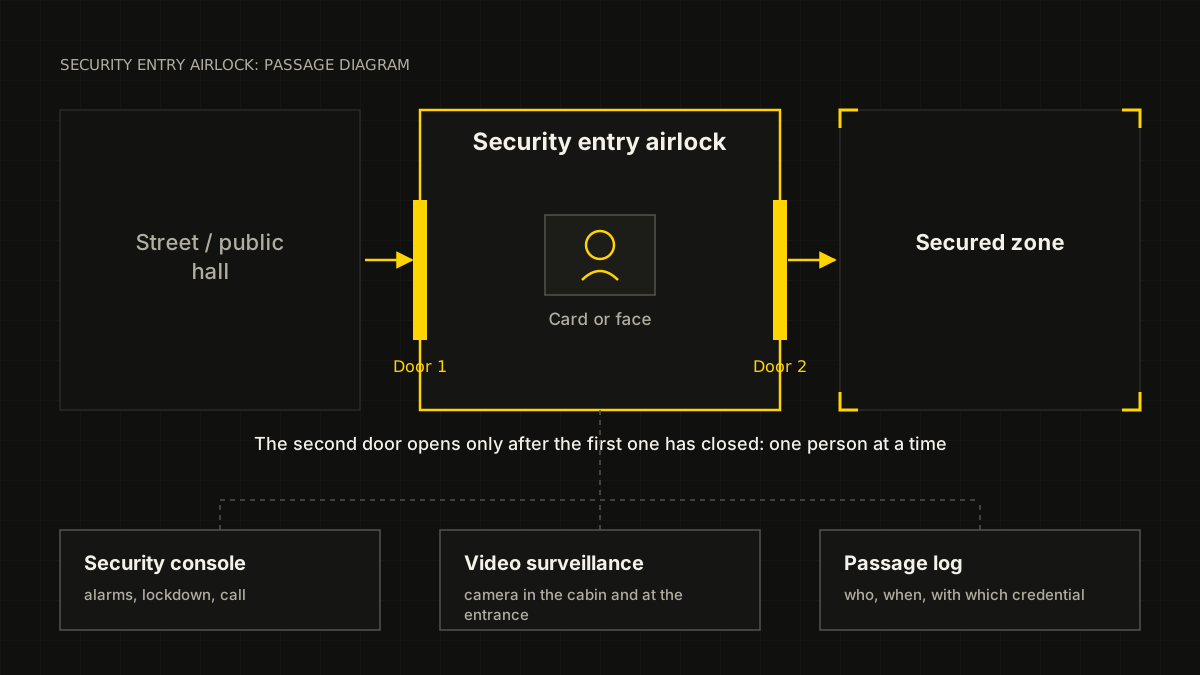
Strictly one person at a time into cash desk areas, vaults, server rooms and secured zones.
Face and card access
Card, face or both factors together. Face access is for employees who have given written consent.
Patient face check-in
A patient who gave consent when booking is recognized at the entrance, and registration staff and the doctor see that the patient has arrived.
Video analytics at entrances
Two people passing on one pass, entry into a restricted zone, an unattended security post — events with a frame and a video clip.
Banks and secured zones
Security entry airlocks and dual control
A security entry airlock lets exactly one person through: the second door opens only after the first one has closed and access rights have been confirmed. For vaults, dual control can be configured — entry only together with a second authorized employee.
- design, supply, installation and commissioning;
- card and face readers, integration with the security monitoring console and video surveillance;
- an entry log with a frame of every passage;
- a signature and a record chain — retroactive editing of the log is detected by verification.
Hospitals and clinics
Patient face check-in
Part of n7kel’s current projects for multi-specialty hospitals. The hospital is the personal data controller. Biometrics are a special category of personal data, so the solution works only for patients who have given consent. Details are on the Hospitals and clinics page.
Booking and consent
The patient books an appointment on the hospital website and, separately and voluntarily, consents to recognition at the entrance or declines it; declining does not affect the booking or the appointment.
Data verification
The booking details are checked against sources the hospital is legally entitled to use, through the hospital’s own access; n7kel does not get access to registries.
Recognition at the entrance
A camera at the entrance recognizes the patient and matches them with booked appointments.
The appointment opens
Registration staff and the doctor see that the patient has arrived. Without consent or without a confirmed match, the patient registers at the desk as usual.
Module under an agreement with government authorities
Checking vehicles and faces against wanted lists
If the client requires it, license plates, vehicles and visitors’ faces at vehicle and pedestrian entrances can be checked against the wanted lists of the Ministry of Internal Affairs, the National Security Committee and other authorized bodies. The module is available only under an agreement with the relevant government authorities and in the manner established by law. In the event of a match, a notification goes to an authorized member of the client’s security department and, as the agreement provides, to the authority.
- 10:41:52Plate 482 KMT 00Gate 1No match
- 10:42:03Face · Visitor 0213Entrance ANo match
- 10:42:05Plate 123 ABC 00Gate 1Match
- 10:42:11Plate 915 BCA 00Gate 2No match
Sample data
Match: plate 123 ABC 00
Routed to: security duty officer · 10:42:06
The authority is notified as the agreement provides
Status: awaiting confirmation
Scenarios
Typical scenarios
| Site | Task | What n7kel Access does |
|---|---|---|
| Bank | Strictly one person at a time into the cash desk area | Security entry airlock, card and face access, entry log |
| Bank | Vault entry | Dual control through access control, a frame of every passage |
| Hospital | A patient arrives for a booked appointment | Face check-in, the appointment opens automatically — only with the patient’s consent |
| Hospital | Intensive care, operating suite, pharmacy | Access for department staff only, separation by department |
| Plant | Entry with someone else’s pass | Turnstiles, face access for employees who have given consent, video analytics at the entry point |
| Business center | Different tenants and floors | Rights by tenant, floor and time, guest access |
| Vehicle entrance to the grounds | A wanted vehicle | License plate checks against databases — only under an agreement with government authorities |
Privacy and the law
Whom the system recognizes, and on what basis
- visitor recognition is off by default; it is enabled only by the client’s decision, as a separate module, and only on a lawful basis;
- patients — only with consent given when booking an appointment; without consent, standard registration;
- checks against wanted lists — only under an agreement with the authorized government bodies and in accordance with the law;
- employees — face access only with written consent; without consent, a card;
- the client is the personal data controller; reference images are stored within the client’s environment and deleted when consent is withdrawn;
- all data stays with the client, is confidential and is not shared with third parties, except for transfer to an authority expressly provided for by the agreement and the law;
- the final legal assessment is made by the client’s lawyer.
Integration
We keep what already works
- existing access control systems, turnstiles and readers — we keep them if they fit the task and build on them;
- HR systems and 1C — for the employee directory and access rights;
- the hospital’s appointment system and website — for patient face check-in;
- security monitoring consoles and video surveillance — events and entry logs;
- n7kel Vakhta, n7kel Flow and n7kel Atlas — a common picture across the site and the network.
Project
How a project runs
Site survey
Entrances, zones, existing access control and cameras, requirements of the security department and IT.
Design
Equipment layout, access rights, the legal framework for recognition.
Supply and installation
Equipment, installation, commissioning, acceptance.
Operations
Staff training, 24/7 support and updates under the contract.
Let’s discuss your entrances and zones
We will survey the site and propose an access control design. The price is determined after the site survey.
The interfaces in the illustrations are schematic mockups with sample data.