Solutions · Retail, warehouses, logistics
Checkout, warehouse and loading under control
In a store, losses arise at the checkout; in a warehouse, during receiving, counting and loading. For checkouts, n7kel offers AI anti-fraud — n7kel Antifraud; for the warehouse and posts, n7kel Vakhta; for the sales floor, n7kel Flow. Everything connects to the cameras you already have and reports what needs attention with a frame and a video clip.
Challenges
Where losses and risks arise
Checkout
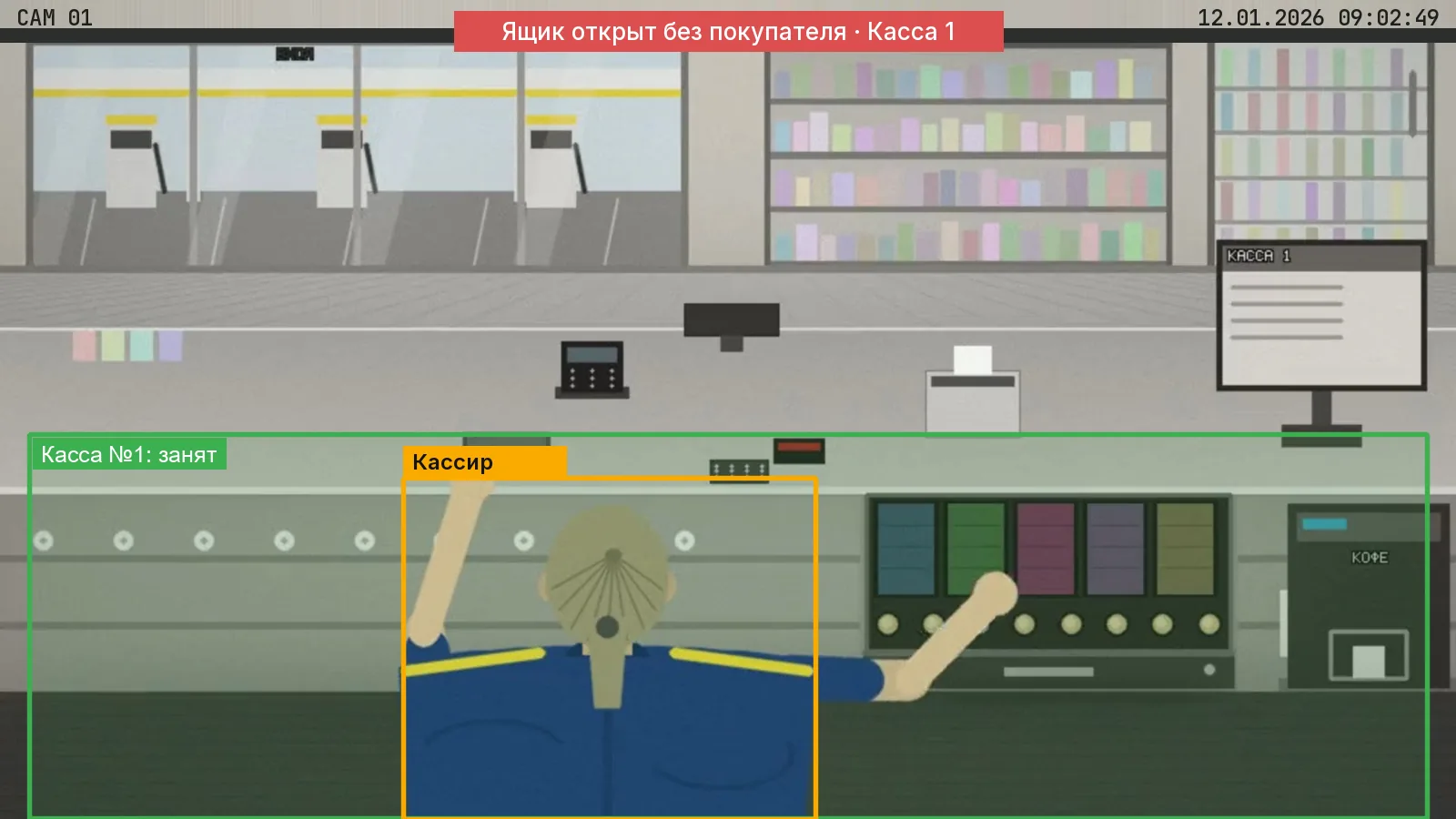
Refunds without a customer, the drawer opened without a receipt, unscanned items, working under someone else’s account.
Cash counting
Counting cash and valuables outside the designated place and procedure.
Loading and warehouse
Working without a vest or helmet, entering the vehicle operating zone, unattended receiving posts.
Absences
The checkout or post is unattended during peak hours while a customer waits.
n7kel Antifraud
AI anti-fraud at checkouts
n7kel Antifraud matches the cashier actions seen by the camera against POS transactions and reports any discrepancy with a frame, a video clip and the receipt lines.
- the cash drawer opened without a receipt;
- refunds and voids with no customer at the checkout;
- goods handed over without scanning, or not all items scanned — “sweethearting”;
- working under someone else’s account — only for employees who have given written consent;
- receipt reconciliation and analytics of recurring schemes by checkout, shift and store across the chain.
Transactions are sent from the POS system or 1C via API or as a CSV or XLSX file. The fit with your checkout procedures is verified in the pilot. More about n7kel Antifraud
Mismatches for review
- 110:11:42Drawer opened without a receiptCashier 03New
- 210:16:20Refund without a customerCashier 03In review
- 310:21:55Goods handed over without scanningCashier 03New
Scenarios
Typical scenarios
n7kel Antifraud, n7kel Vakhta, n7kel Flow — our products on your cameras. We design and implement — security systems that we supply, install and integrate.
| Location | Situation | What n7kel does |
|---|---|---|
| Checkout | Refund without a customer | n7kel Antifraud: the till transaction is reconciled with the situation at the checkout |
| Checkout | Goods handed over without scanning | n7kel Antifraud: an event with a clip of the handover and the receipt lines |
| Checkout | The cashier has stepped away, customers are waiting | n7kel Vakhta: an event when the threshold is exceeded; n7kel Flow: real-time checkout queues |
| Sales floor | Which areas work and which stay empty | n7kel Flow: heat map, routes, time in zones — anonymously |
| Checkout, back office | Cash counting | n7kel Vakhta: an action flag with a frame and video |
| Loading dock | Working without a vest, entering the vehicle operating zone | n7kel Vakhta: a workwear violation, a critical event for the hazardous zone |
| Receiving post | Post unattended | n7kel Vakhta: post occupancy, absences by shift |
| Warehouse | Person on the floor | n7kel Vakhta: an immediate notification |
| Warehouse, grounds | Access to storage zones, perimeter | We design and implement: n7kel Access, perimeter and site video surveillance |
Analyze causes rather than look for someone to blame
- a violation is a signal for review by a person; no penalty follows automatically;
- a case can be closed only with a comment, including as a “false alarm”;
- the employee can see the clip and give an explanation;
- analytics shows what to change in how the site operates: shift handovers, refund confirmation, personal accounts, breaks during peak hours.
What is needed to start
n7kel AI is trained and tested on ordinary 2D images, so the cameras you already have are suitable. 3D cameras are supported too, if they are already on site or the task requires them.
- recordings from cameras above the checkouts and in the warehouse — under a non-disclosure agreement;
- a sample export of POS transactions or access to the POS API;
- a list of warehouse posts and hazardous zones;
- a pilot of 2–4 weeks at 1–2 sites, with a report against agreed criteria.
Frequently asked questions
Will the cameras already installed in the store and warehouse work?
As a rule, yes. For the checkout, an overhead view of the post matters: the frame should include the cash drawer, the terminal, the counter and the cashier’s hands. We check the suitability of every camera during the site survey.
Does the system recognize customers?
Not by default. n7kel Antifraud does not recognize customers, and n7kel Flow counts them anonymously: at the checkout, what matters is whether a person was there, and on the sales floor, how many people there are and where. Visitor recognition is off by default and is enabled only by the client’s decision, as a separate module on a lawful basis. Employees are identified only with their written consent. Bystanders’ faces in event frames are blurred.
How do we connect our POS system?
The POS software or an intermediate service, including one built on 1C, sends transactions via the REST API, or an export is uploaded as a CSV or XLSX file. We assess the adapter for your software based on its export.
Can the system learn our loss patterns?
Yes. We train n7kel AI further for the client’s tasks: new actions, objects, and checkout and warehouse scenarios, using examples from your sites.
Let’s discuss your stores and warehouses
We start with recordings from your cameras and a POS export, and show what the system finds at your sites.
Frames show n7kel AI output on licensed stock footage and on a synthetic checkout scene; people’s faces are blurred. The interfaces in the illustrations are schematic mockups with sample data.